
The handoff nobody saw
Your AI escalates a chat, but the alert sits in a browser tab that is closed. By the time someone opens the dashboard, the visitor is gone.
Push alert on your phone the second it escalates.
Most chatbot tools stop at the browser dashboard — so the moment you leave your desk, your visitors wait. The mydaksh mobile app pushes every handoff, ticket and message straight to your phone, and lets you reply on the spot.
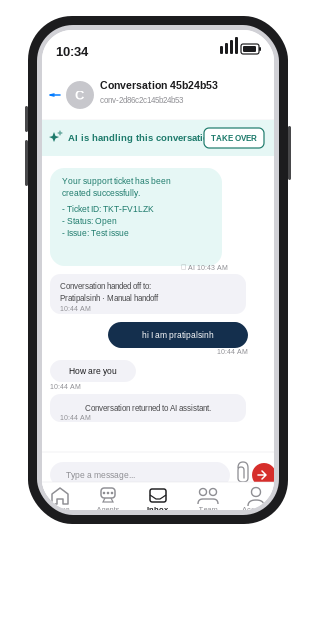
The AI handles most conversations alone. The few it escalates are the ones worth money — and those are exactly the ones a desktop-only tool makes you miss.
Your AI escalates a chat, but the alert sits in a browser tab that is closed. By the time someone opens the dashboard, the visitor is gone.
Push alert on your phone the second it escalates.
A question at 8pm gets answered at 10am. For a buyer comparing three options, that delay decides who gets the order.
Reply in seconds from wherever you are.
Shop floors, site visits, clinics and events are where small teams actually spend the day — not in front of a dashboard.
Full inbox, tickets and agents in your hand.
Manage website visitors, conversations and agents from anywhere — the app is a full control room, not a notification bell.
Every new chatbot message, escalation and ticket arrives as a push alert — so you know the moment a visitor needs you, not hours later.
Open the conversation and reply in the same thread the visitor is in. They stay on your site; you answer from wherever you are.
When the AI escalates, you get the full history and the visitor's details already attached. Take over in a tap, hand it back when you're done.
See open, pending and priority tickets in one queue. Filter, reply and close them from the app — no laptop required.
Check how each agent is performing, pause one, or switch it back on — agent management travels with you.
Watch live visitors and conversations as they happen, so you can step into the ones that matter before they leave.
Plenty of platforms will email you that a chat needs attention. Far fewer let you actually run the conversation, the ticket queue and your agents from a phone.
| From your phone | Dashboard-only tools | mydaksh app |
|---|---|---|
| Reply to a live visitor from your phone | Usually not available | Included |
| Push alert the moment the AI escalates | Usually not available | Included |
| Full support ticket queue on mobile | Usually not available | Included |
| Start, pause and check AI agents on mobile | Usually not available | Included |
| See live visitors while you're away from the desk | Usually not available | Included |
Free on the App Store and Google Play, and included with every mydaksh plan — no separate licence.
Use your existing mydaksh login, protected with biometric unlock on your device.
Choose what pings you — handoffs, priority tickets, new leads — and the app takes it from there.